
We're excited to announce the launch of Zylpha Auto, our first AI-powered assistive tools designed to help legal teams create bundles faster and more accurately than ever before.
Over the past 12 months, our team has worked closely with selected clients and partners to develop the first generation of AI tools for the Zylpha platform. As a business that wants to make building Court bundles as easy as possible, we have seen first hand how AI platforms have changed how people interact with software products, as well as provide new ways of working that have previously been unobtainable.
Today, we're delighted to make the first two AI-powered features available to all Teams Plan subscribers through an opt-in programme. We know that not all clients will want to enable these features, which is why we’ve made them opt-in.
Zylpha Auto has been built to reduce repetitive manual administration during bundle creation, specifically when adding new files and documents to your workspace. Our hope is that these new tools can helping users save valuable time whilst improving consistency.
Zylpha Auto is the overarching name for our AI features and this time around, introduces intelligent file suggestions directly within the bundle editor.
When adding documents to a bundle, users will now see an "Auto" option. Once selected, Zylpha Auto analyses the chosen files and can automatically suggest:
These suggestions can be reviewed and applied, making it easier to organise bundle contents accurately and efficiently.
We know that Court bundles are getting bigger, and they’re containing more documents than ever before. This means it’s really easy to miss descriptions and dates which are not 100% as they should be. Rather than forcing users to manually check each description and date line by line, we’re trying to make things easier and more efficient.
Using Zylpha Auto is simple:
Step 1: Select Your Documents
Choose a single document or multiple files within your bundle.
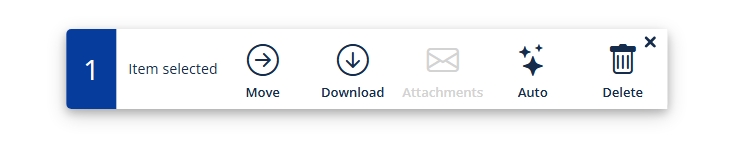
Step 2: Click "Auto"
Select the new Auto option from the action menu.
Step 3: Choose Your Preferences
You'll be given the option to generate:
Simply toggle the options you wish to apply and start the process.
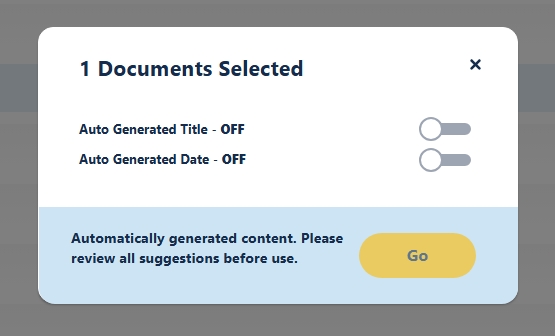
Step 4: Review the Results
Once complete, the selected document information will be updated automatically.
Any title or date generated using Zylpha Auto will display the Auto icon, allowing you to clearly identify AI-assisted updates.
The launch of Zylpha Auto marks the first step in our wider AI roadmap.
We're actively developing additional AI-powered tools and enhancements that will further streamline the court bundling process. Over the coming months, we'll be introducing new capabilities designed to save time, reduce repetitive tasks, and help legal professionals work more efficiently.
Absolutely not! We see this as providing additional resources to users so that they can create, edit and share Court bundles in the most efficient way possible. We see our tools as assistive technology within our Court bundling platform, not as replacements for people.
As always, client feedback is central to our development process. If you have ideas, suggestions, or comments on Zylpha Auto, we'd love to hear from you through the in-app chat.
How to Enable Zylpha Auto
Zylpha Auto is available as an opt-in feature for all Teams Plan subscribers.
Some more articles of interest
Create your first electronic Court bundle in minutes, quickly & easily for free