
At Zylpha, we're continually evolving our court bundling platform to help legal teams work more efficiently, reduce administrative burden, and ensure compliance with changing court requirements.
Our latest product update introduces a range of new features and enhancements designed to improve usability, streamline document preparation, and give users greater control over how bundles are produced and managed.
Here's what's new:
We've introduced a refreshed user interface across key areas of the platform to make bundle management more intuitive and efficient.
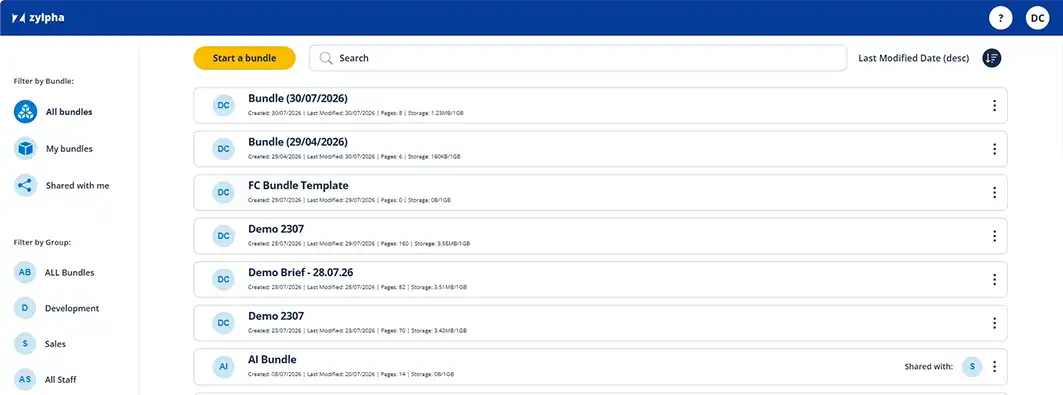
The bundle list view has been redesigned to provide a cleaner, more modern experience. Users can navigate bundles more easily, helping teams quickly locate and manage active matters.
We've also updated the properties side panels, making it simpler to access and adjust bundle settings without disrupting your workflow.
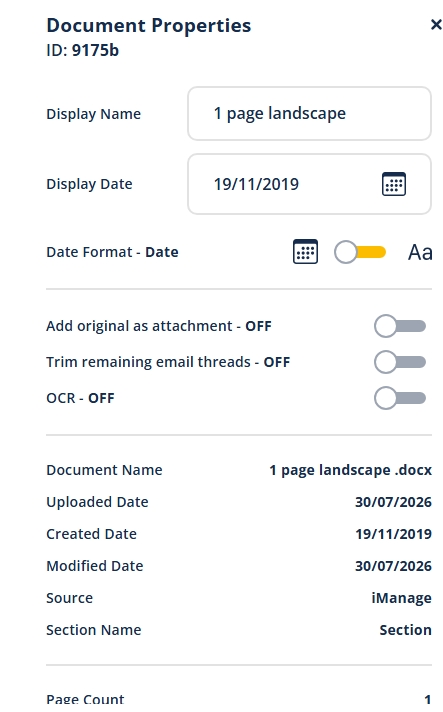
These enhancements are designed to reduce clicks, improve visibility of important settings, and create a smoother overall user experience.
Users can now edit bundle front pages directly within the PDF Editor, removing the need for external editing tools and allowing final adjustments to be made quickly without leaving the platform.
This provides greater flexibility while helping maintain consistency across all court bundles.
Compliance remains a key consideration for legal professionals preparing court documentation.
We've introduced the ability to produce PD27A-compliant bundles, helping family law teams create bundles that align with the Practice Direction requirements. The revised guidelines clearly set out the structure for both financial remedy proceedings as well as non-financial remedy proceedings. Zylpha already supports Arabic (numbering using numerals 1, 2, 3 onwards) and Bates (a system where each section of a bundle is denoted by a letter, with each page in that section also being numbered).
To support this enhancement, we've added new options within Index & Pagination settings, including:
These controls provide additional flexibility when configuring bundle structure to meet court requirements and firm preferences.
Email correspondence often forms a significant part of court bundles, and managing lengthy email chains can be time-consuming.
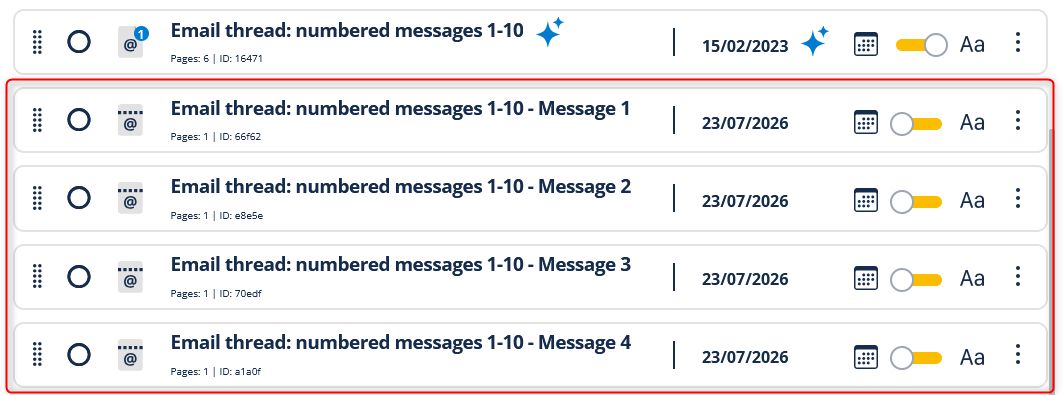
Our new Email Dethreading feature allows users to split email chains into individual messages.
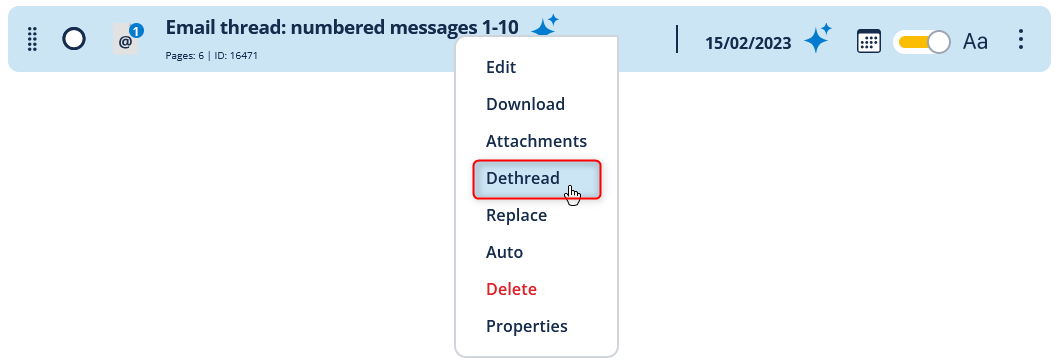
This makes it easier to organise correspondence, review conversations, and ensure only relevant content is included within a bundle.
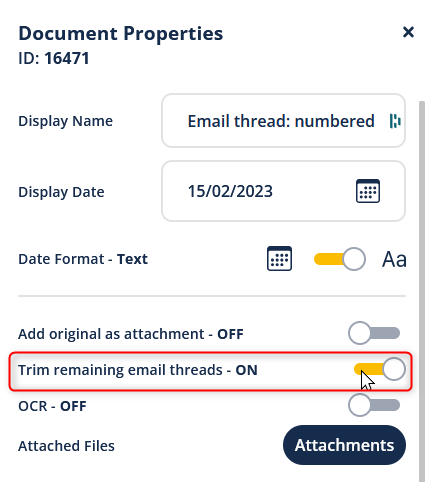
We've also added a Trim Remaining Threads option for email files.
When enabled, only the most recent email in a chain is retained within the final bundle. This helps reduce duplication, minimise bundle size, and improve readability for judges, clients, and other parties.
Together, these new email management tools give users greater control over how correspondence is presented while reducing unnecessary content.
Many legal teams follow a consistent approach when producing bundles.
To help streamline repeat workflows, we've introduced a new "Set as Default" option within Index & Pagination settings.
Users can now save their preferred configuration and automatically apply those settings to every new bundle they create.
For teams producing large volumes of bundles, this means:
We've increased the file size upload limit for:
to 1GB.
This enhancement makes it easier to work with larger documents and PDF files without the need for additional file splitting or compression.
Please note: The file size limit for uploading documents directly into a bundle remains unchanged.
Alongside these new features, we've resolved several issues to improve platform reliability and performance.
Fixes include:
We've also implemented a number of additional minor fixes and improvements behind the scenes to enhance overall platform stability.
Many of these enhancements have been driven by feedback from our users. Whether it's simplifying everyday tasks, improving compliance workflows, or reducing the time spent managing email-heavy cases, our goal remains the same: helping legal teams prepare accurate, court-compliant bundles faster.
If you'd like to see any of these new features in action, we'd be delighted to arrange a demonstration.
Some more articles of interest
Create your first electronic Court bundle in minutes, quickly & easily for free